In the previous post, I used Pulumi to create a VPC. This post picks up where that left off and adds subnets to it.
The complete project is available on GitHub.
Configuration #
A subnet is a logical partition of your network. A VPC spans all availability zones in a region, but each subnet lives in a single availability zone. For high availability, you need at least two zones, each with its own CIDR block. Add this to the YAML file from the previous post:
vpc:subnet-zones: "us-east-1a,us-east-1c"
vpc:subnet-ips: "172.32.32.0/20,172.32.80.0/20"
You can use the command line (e.g., pulumi config set vpc:subnet-zones "us-east-1a,us-east-1c") or edit the YAML file directly. The file is named Pulumi.<name of your project>.yaml.
Creating subnets #
This code extends the previous post. It reads the zone and CIDR block configuration, splits on the comma delimiter, and loops through each zone to create a subnet inside the VPC. Each subnet ID gets added to an array for export to the Pulumi console.
// Create the required number of subnets
subnets := make(map[string]interface{})
subnets["subnet_ids"] = make([]interface{}, 0)

subnetZones := strings.Split(getEnv(ctx, "vpc:subnet-zones", "unknown"), ",")
subnetIPs := strings.Split(getEnv(ctx, "vpc:subnet-ips", "unknown"), ",")

for idx, availabilityZone := range subnetZones {
    subnetArgs := &ec2.SubnetArgs{
        Tags:             tags,
        VpcId:            vpc.ID(),
        CidrBlock:        subnetIPs[idx],
        AvailabilityZone: availabilityZone,
    }

    subnet, err := ec2.NewSubnet(ctx, fmt.Sprintf("%s-subnet-%d", vpcName, idx), subnetArgs)
    if err != nil {
        fmt.Println(err.Error())
        return err
    }

    subnets["subnet_ids"] = append(subnets["subnet_ids"].([]interface{}), subnet.ID())
}

ctx.Export("SUBNET-IDS", subnets["subnet_ids"])
Running the code #
Run pulumi up to add the subnets. If you’re using the same project and stack, Pulumi knows the VPC already exists and will only create the new subnets.
$ pulumi up
Previewing update (builderstack):

     Type                 Name                  Plan
     pulumi:pulumi:Stack  builder-builderstack
 +   ├─ aws:ec2:Subnet    myPulumiVPC-subnet-1  create
 +   └─ aws:ec2:Subnet    myPulumiVPC-subnet-0  create

Outputs:
  + SUBNET-IDS: [
  +     [0]: output<string>
  +     [1]: output<string>
    ]

Resources:
    + 2 to create
    2 unchanged

Do you want to perform this update? yes
Updating (builderstack):

     Type                 Name                  Status
     pulumi:pulumi:Stack  builder-builderstack
 +   ├─ aws:ec2:Subnet    myPulumiVPC-subnet-1  created
 +   └─ aws:ec2:Subnet    myPulumiVPC-subnet-0  created

Outputs:
  + SUBNET-IDS: [
  +     [0]: "subnet-<id>"
  +     [1]: "subnet-<id>"
    ]
    VPC-ID    : "vpc-<id>"

Resources:
    + 2 created
    2 unchanged

Duration: 8s

Permalink: https://app.pulumi.com/retgits/builder/builderstack/updates/2
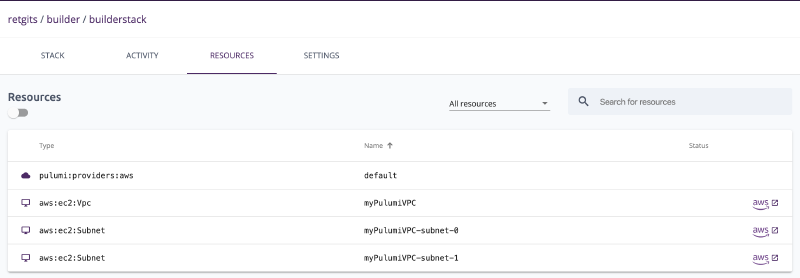
The permalink at the bottom takes you to the Pulumi console where you can see all the details of the execution and the resources that were created.